Mining Basics
Does Crypto Mining Drain Your Phone Battery?
The answer splits cleanly in two, depending on whether an app actually computes anything. One kind is harmless. The other will cost you real battery capacity.
This is the most common practical worry about mobile mining, and it deserves a precise answer rather than reassurance. Whether a mining app drains your battery depends on one thing: does it perform computation on your device, or does it not? Those two cases behave completely differently, and most apps are quietly in the second category.
Below: what actually consumes battery in a phone, why heat rather than discharge is the real long-term concern, how to measure what an app is doing to your own device, and what the numbers mean for whether any of this is worth it.
Two kinds of mining app, two very different answers
Participation-based apps: negligible impact
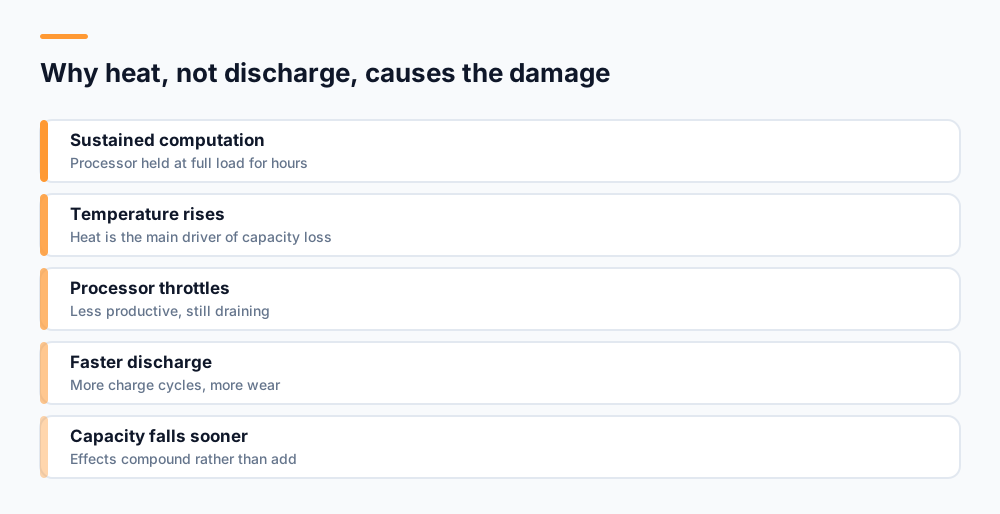
Most legitimate mobile mining projects, including UNC, do not compute anything meaningful on your phone. A mining session is a record on a server that you are participating. The app sends a request when a session starts, occasionally checks status, and updates a counter. Between those moments it does effectively nothing.
The battery cost is comparable to a messaging app sitting idle — a fraction of a percent over hours, mostly from the network requests and keeping the screen on while you look at it. There is no sustained processor load, therefore no heat, therefore no accelerated wear. You could run this for years with no measurable effect on battery health.
On-device hashing: significant and cumulative
A minority of apps genuinely run hash computations on your phone, usually contributing to a mining pool. These push the processor to sustained full load, which is close to the heaviest thing a phone can do. Expect rapid discharge — a full battery in a couple of hours is typical — and noticeable heat.
Rapid discharge is annoying but reversible. The cumulative damage is the part that matters, and it comes from temperature rather than from the discharging itself.
Why heat matters more than discharge
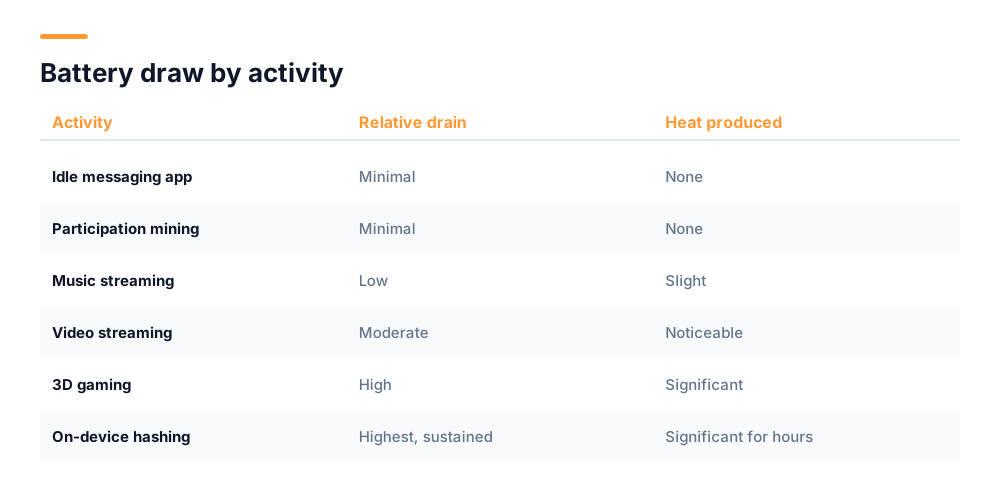
Lithium-ion batteries degrade through chemistry, not through use per se. Two factors dominate: the number of charge cycles, and the temperature the cell spends time at. Temperature is the more aggressive of the two, and it is the one heavy computation drives.
A battery kept near room temperature might retain around 80 percent of its original capacity after a few years of normal use. The same battery regularly operating at elevated temperatures can reach that point substantially sooner. Sustained hashing keeps a phone warm for hours at a time, which is exactly the condition that accelerates capacity loss.
The compounding problem
Heavy computation also drains the battery faster, so you charge more often, which adds cycles. Charging while the phone is already hot is worse still. The effects stack rather than merely adding up.
There is a secondary effect too. When a phone gets hot, it throttles its processor to protect itself. So a hashing app becomes progressively less productive the longer it runs, while continuing to consume battery at a high rate. The economics get worse the longer you leave it on.
What actually consumes a phone battery
It helps to know where the power goes, because it explains why participation-based mining costs so little. In a typical phone the screen is usually the largest single consumer, particularly at high brightness. After that come the radios — cellular, Wi-Fi, GPS — and then the processor.
Critically, the processor is not a constant drain. Modern phone chips idle at extremely low power and ramp up only when given work. They also contain a mix of efficiency and performance cores, and the system moves light tasks onto the efficient ones. An app that makes a network request every few minutes barely touches the performance cores at all.
This is why "mining" in the participation sense costs almost nothing measurable. The work involved — a request, a response, a counter update — is the same order of magnitude as checking for new email. What changes the picture entirely is asking the performance cores to run flat out continuously, which is exactly what hashing does and nothing else on a phone sustains for hours.
It also explains an easy misattribution. If you open a mining app and stare at an animated dashboard for twenty minutes, you will use noticeable battery — but the screen did that, not the mining. Checking a session and closing the app costs almost nothing. Watching a progress bar at full brightness is an ordinary screen-on cost that would apply to any app.
How to check what an app is doing to your phone
You do not have to take any app's word for it. Your phone already records what you need, and three checks take about ten minutes.
- The touch test. Run the app for ten minutes with the screen off. Then feel the back of the phone near the camera. Participation-based mining leaves it at ambient temperature. If it is warm, computation is happening.
- Battery usage by app. On Android, open Settings, then Battery, then Battery usage. Compare the mining app against apps you barely use. If it is near the top of the list, it is doing real work.
- Overnight discharge. Note the percentage before bed with the app running and the screen off, and again in the morning. A well-behaved app costs a few percent over eight hours. Ten percent or more means something is running continuously.
It is also worth checking battery health directly, which tells you the cumulative story rather than the current draw. Recent Android versions expose this under Settings, Battery, Battery health. Note the figure when you install a mining app and check again after a couple of months. If capacity has dropped noticeably faster than before, you have your answer.
| Check | Participation-based | On-device hashing |
|---|---|---|
| Phone temperature after 10 min | Ambient | Noticeably warm |
| Battery usage ranking | Low, near idle apps | Top of the list |
| Overnight drain, screen off | 2-4% | 30%+ or fully flat |
| Processor throttling | None | Progressive |
| Long-term capacity effect | None measurable | Accelerated loss |
Reducing the impact if you want to keep mining
If you have decided to run an app that does compute, or you simply want to be careful, a few habits limit the damage.
- Do not run it while charging. Charging generates heat by itself, and adding computational load on top produces the worst conditions for the cell.
- Take the case off during long sessions. Cases trap heat, and a phone under sustained load needs to shed it.
- Keep it out of direct sunlight and off soft surfaces like beds, which insulate the back panel.
- Use battery optimisation settings to restrict background activity, which limits the app to periods you are actively using it.
- On Android, cap charging at 80 percent if your phone offers it. Sitting at full charge is another stressor.
- Consider running such apps on an old spare phone rather than your daily device, if you want to participate without risking hardware you depend on.
For participation-based apps none of this is necessary. There is nothing to mitigate, because there is no sustained load to manage.
Is the trade worth it?
For on-device hashing, the arithmetic is not close. A phone produces a minuscule share of a mining pool's total hash rate, so your share of rewards is correspondingly tiny — realistically fractions of a cent per day. Against that you are consuming electricity, degrading a battery whose replacement costs a meaningful amount, and losing the use of your phone while it runs hot.
Framed as a purchase, you are spending battery lifespan worth perhaps tens of currency units to earn perhaps a few units of coin value. Even if the coin appreciates, you started from a position where the input cost exceeded the output.
For participation-based mining the calculation is entirely different, because the cost side is close to zero. You spend a few seconds a day and no meaningful battery. Whether it is worthwhile then depends only on whether the coin ever becomes valuable, which is genuinely uncertain — but you are not paying hardware wear for the chance.
The honest summary
If an app warms your phone, the reward almost certainly does not justify the hardware cost. If it does not warm your phone, battery drain is not a reason to avoid it. Temperature is the whole decision.
Does an older phone change the answer?
Somewhat, and in both directions. An older battery has already lost capacity, so the same power draw empties it faster and it reaches higher temperatures under load because its internal resistance has increased. If a two-year-old phone gets uncomfortably hot running an app that a new one merely warms, that is expected rather than alarming.
The consolation is that on an older device you have less to protect. A battery already at seventy percent of its original capacity, in a phone you plan to replace within a year, is a far less valuable thing to spend than the battery in a handset you need to last another three. This is the reasoning behind using a retired phone for anything computationally heavy — the wear lands on hardware whose remaining life you had already written off.
One genuine caution with older devices: swollen or visibly deformed batteries should not be subjected to sustained heat under any circumstances. If the back panel of a phone no longer sits flush, or the screen appears lifted at an edge, stop using that device for anything demanding and have the battery replaced. That is a safety matter rather than a longevity one.
Beyond battery: what else to watch
Battery is the concern people ask about, but two others deserve a glance. Data usage can be significant on apps that poll frequently or serve heavy advertising, which matters on a metered connection — check per-app data usage in your settings after the first week.
Storage is worth watching too. Some apps accumulate cached advertising creative and logs indefinitely. If an app has grown to hundreds of megabytes for what is essentially a counter and a button, that is a sign of poor engineering, and poor engineering is a reasonable proxy for how carefully everything else was built.
For the wider picture of what mobile mining apps are actually doing, and how to tell a real project from a fake one, see our guide on how mobile crypto mining works. For permissions and account security, our guide on whether mobile crypto mining is safe covers the risks that matter more than battery.
UNC is built on the participation model described at the top of this article — no hashing runs on your handset, which is why the battery cost is a rounding error. You can follow what we are building as it ships:
The next chapter is being built today. 🟠🚀 UNC — The Honest Human Chain. #UNC #TheHonestHumanChain #FutureTech
— UNC (@uncofficials) September 23, 2026
Frequently asked questions
Does crypto mining drain your phone battery?
It depends on the app. Participation-based mining apps use almost no battery — comparable to an idle messaging app — because no real computation happens on your device. Apps that genuinely run hashing on your phone drain the battery heavily, often flattening it within a couple of hours, and generate significant heat.
Can crypto mining permanently damage my phone battery?
Sustained on-device hashing can, because it keeps the battery at elevated temperatures for long periods and heat is the main driver of lithium-ion capacity loss. It also causes more frequent charging, adding cycles. Participation-based apps have no measurable long-term effect.
How can I tell if a mining app is really using my phone processor?
Run it for ten minutes with the screen off and feel the back of the phone. Real computation makes it noticeably warm. You can confirm in Settings under Battery usage, where a computing app will rank near the top, and by checking overnight discharge with the screen off.
Is it safe to mine crypto while charging my phone?
Avoid it if the app performs real computation. Charging generates heat on its own, and adding sustained processor load creates the worst conditions for battery longevity. For participation-based apps there is no meaningful load, so charging while mining is not a concern.
How much can you earn from phone hashing versus the battery cost?
Realistically fractions of a cent per day, because a phone contributes a negligible share of any mining pool. Set against electricity use and accelerated battery wear — and a replacement battery is not cheap — the input cost exceeds the output before any coin appreciation.
Start mining with UNC
UNC distributes coins to verified participants — no hardware, no subscription, no battery drain. Read the whitepaper for the distribution model, or check network activity in the explorer.
Get UNC on Google Play