Security
Is Mobile Crypto Mining Safe? What to Check First
The dangerous part of mobile mining is rarely the mining. It is the permissions you grant, the people who contact you afterwards, and the apps that were never real. Here is what to actually check.
When people ask whether mobile crypto mining is safe, they usually mean one of two different things: will this damage my phone, and will this cost me money? Both are reasonable worries, and they have different answers. The hardware risk is mostly overstated. The security risk is mostly understated. Getting the distinction right is what keeps you out of trouble.
This guide covers what a mining app can and cannot do to your device, which permissions should make you close the app immediately, how the scams that target mining users actually work, and a short checklist you can run before trusting any app with your time.
Can a mining app damage your phone?
It depends entirely on whether the app is doing real computation. Most are not. Participation-based apps, which is the majority of legitimate mobile mining projects, simply record that you checked in and calculate rewards on their servers. Your phone makes a few network requests. There is no sustained processing, so no heat, and no accelerated battery wear.
Apps that genuinely run hashing on your device are a different matter. Sustained full-load computation produces heat, and heat is the main thing that degrades lithium-ion batteries over time. Running such an app for months will measurably reduce your battery capacity. Given that the earnings from phone-based hashing are worth less than the electricity consumed, that is a poor exchange.
A simple test
Run the app for ten minutes and feel the back of your phone. Participation-based mining will not warm it at all. If it is noticeably hot, real computation is happening, and you should decide whether the reward justifies the wear on your hardware.
There is one more device-level concern worth mentioning: data usage. A well-built mining app uses a trivial amount of bandwidth. Some poorly built ones poll constantly or load heavy advertising, which can consume a surprising amount of a metered connection. Your phone settings will show per-app data usage, and it is worth checking after the first week.
Permissions: the clearest warning signal
This is the most useful thing you can check, and almost nobody does it. A mining app needs remarkably little access to your device. When one asks for far more than its function requires, that gap is the story.
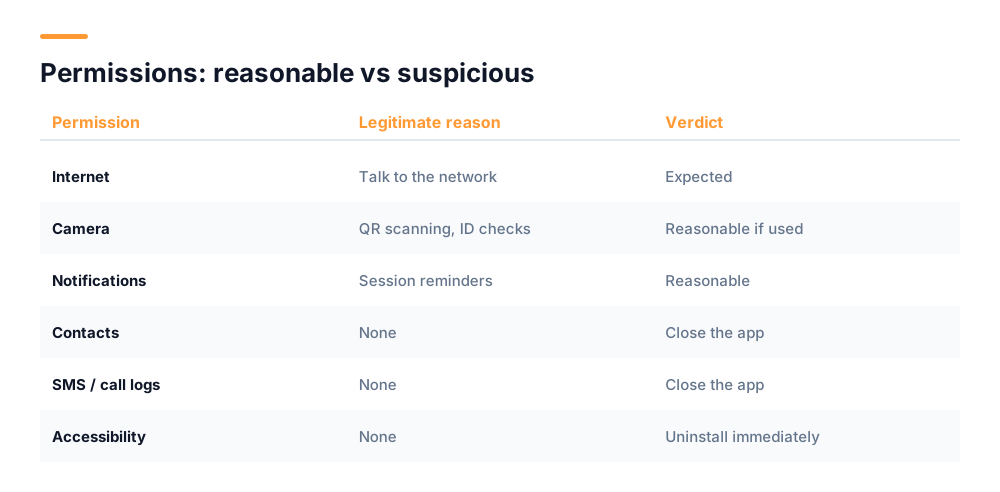
Reasonable requests have an obvious purpose. Internet access is needed to talk to the network. Camera access makes sense if the app scans QR codes or performs identity verification. Notifications make sense if it reminds you to start a session. Each maps to a feature you can point at.
Requests that should stop you: access to your contacts, SMS messages, call logs, precise location, or accessibility services. None of these have any legitimate role in distributing coins. Contacts and SMS in particular are the classic combination for harvesting data to sell, or for intercepting the one-time codes that protect your other accounts.
Accessibility permissions are the serious one
Android accessibility services can read everything on screen and interact with other apps on your behalf. A mining app has no reason to request this. Malware uses it to read banking apps and authorisation codes. If an app asks, do not grant it — uninstall instead.
You can review what you have already granted at any time. On Android, open Settings, then Apps, select the app, and open Permissions. Revoke anything you cannot connect to a feature you actually use. If the app stops working without your contact list, that tells you what it was really for.
The real risk is social, not technical
Almost every account loss in crypto happens because somebody was persuaded to hand over access, not because software was broken. Attackers do not need to defeat encryption when they can simply ask you convincingly. Users of mining apps are a particularly targeted group, because they are often new to crypto and hold a balance they are keen to protect.
Fake support staff
You post a question in a public group about a mining problem. Within minutes, someone messages you privately claiming to be support. They are friendly and knowledgeable. They ask you to verify your account by sharing your recovery passphrase, or to connect your wallet to a "diagnostic" site. Your balance disappears.
The defence is a rule with no exceptions: real support never contacts you first, and never asks for your passphrase. If someone messages you unprompted about your account, they are not who they claim to be, regardless of how helpful they seem or how convincing their profile looks.
Giveaway and doubling schemes
A post announces that the project is celebrating a milestone by doubling any coins sent to a specific address. It looks official, often using copied branding and a near-identical username. Anything sent is simply gone. No legitimate project has ever run a scheme where sending crypto returns more crypto, because that transaction makes no sense from the project's side.
Cloned apps
A copy of a real mining app appears in an app store or on a website, using the same name, icon and screenshots. It exists to capture your login details or seed phrase the moment you enter them. Always install from the official store listing linked from the project's own website, and check the developer name and review count rather than trusting the icon.
Withdrawal fee demands
You try to withdraw and are told a fee must be paid first to unlock the transaction. You pay it. Then another fee appears. This continues as long as you keep paying. Legitimate networks deduct transaction fees from the amount being sent; they do not require a separate upfront payment to release your own balance.
| Approach | What they want | The rule that stops it |
|---|---|---|
| Fake support | Your passphrase | Support never contacts you first |
| Giveaway scam | Crypto sent to an address | Sending never returns more |
| Cloned app | Login details | Install only from the official listing |
| Withdrawal fee | An upfront payment | Fees come out of the amount sent |
| Phishing link | Passphrase via a fake site | Type URLs yourself |
How to protect yourself properly
A handful of habits eliminate most of the risk. None require technical skill, and they matter far more than any setting inside the app.
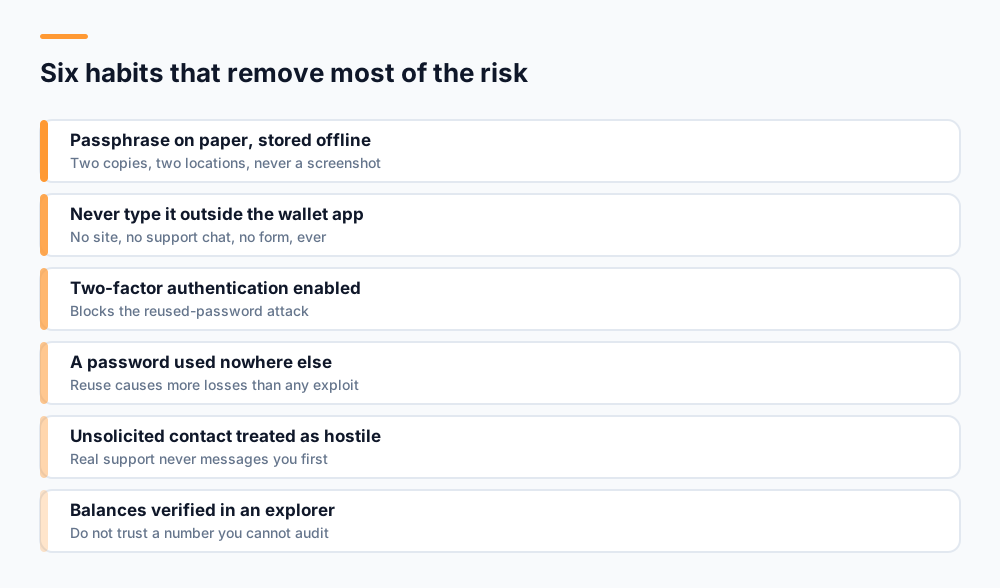
- Write your recovery passphrase on paper and store it somewhere you will still find it in two years. Well-designed wallets cannot recover it for you — that is the point of the design, not a flaw.
- Never type your passphrase into anything except the app itself when it explicitly asks during recovery. No website, no support chat, no form, ever.
- Enable two-factor authentication and biometric unlock. This blocks the most common attack, which is a reused password found in an unrelated data breach.
- Use a password you have never used elsewhere. Password reuse causes more account losses than any sophisticated attack.
- Treat unsolicited contact as hostile by default, in every channel, no matter how legitimate it looks.
- Verify balances in a public blockchain explorer rather than trusting a number in an app you cannot audit.
Is the app itself legitimate?
Separate from security, there is the question of whether an app is genuine at all. A large share of mining apps mine nothing and exist to serve advertising while showing you a number that never becomes withdrawable.
- Can coins actually be withdrawn, and has anyone publicly confirmed doing so?
- Is there a public blockchain explorer where you can verify your balance independently of the app?
- Does the project explain how rewards are calculated in specific terms?
- Does it avoid promising fixed returns? Guarantees are always a warning sign.
- What do the one and two star reviews say? Withdrawal complaints are the signal that matters.
- Is there a real website, whitepaper and identifiable team, rather than only an app listing?
A project that publishes its distribution model, operates a public explorer, and states plainly that coin value is uncertain is being straight with you. That transparency is a more reliable quality signal than any earnings figure, because honest numbers are unimpressive and dishonest ones are easy to invent.
What about your data?
Battery and theft get the attention, but there is a quieter question: what does the app learn about you, and where does it go? Mining apps that involve identity verification necessarily handle sensitive material — a government ID, sometimes a selfie — and that deserves the same scrutiny you would apply to a bank.
Look for a privacy policy that states specifically what is collected, why, how long it is kept, and whether it is shared. Vague assurances about taking privacy seriously are not a policy. On Android, the Play Store listing includes a Data Safety section declaring what the developer says it collects; comparing that against the permissions the app requests is a useful consistency check, because a mismatch means one of the two is inaccurate.
Also check whether you can delete your account and data. A project that offers a clear deletion route is one that has thought about the obligation. One that makes it impossible, or requires an email that goes unanswered, is telling you how it regards your data.
So — is it safe?
Using a legitimate, participation-based mining app is about as risky as using any other account-based service on your phone. It will not harm your device, and the app itself is not the threat. What you are really managing is account security and your own scepticism toward people who contact you.
Where people genuinely lose money is not mining at all. It is paying for cloud mining contracts that never pay out, sending coins to giveaway addresses, or handing a passphrase to somebody impersonating support. All three are avoidable with the rules above, and all three are far more common than any technical exploit.
Nobody at any legitimate crypto project will ever ask for your recovery passphrase. There is no exception, no special case, and no verification process that requires it.
If you want the mechanics of how participation-based mining differs from proof-of-work, our guide to how mobile crypto mining works covers it, and the whitepaper documents UNC's distribution model and verification approach in full.
Frequently asked questions
Is mobile crypto mining safe for your phone?
For participation-based apps, yes. They do almost no computation on your device, so there is no heat and no meaningful battery wear. Apps that genuinely run hashing on your phone do generate heat and shorten battery life, and the earnings do not justify it. If your phone gets warm while mining, real computation is happening.
What permissions should a crypto mining app not ask for?
Be very cautious about contacts, SMS, call logs, precise location and especially accessibility services. None of these are needed to distribute coins. Accessibility permissions are the most serious, because they let an app read your screen and act on your behalf, which malware uses to reach banking apps and one-time codes.
How do people actually lose crypto from mining apps?
Almost always through social engineering rather than technical attacks. The common patterns are fake support staff asking for your recovery passphrase, giveaway schemes that promise to double coins you send, cloned apps that harvest logins, and demands for an upfront fee before a withdrawal is released.
Will a mining app ever need my recovery passphrase?
Only the wallet app itself, during recovery, when you have chosen to restore an account. Never a website, never a support conversation, never a form, and never someone who contacted you. If anything else asks, it is an attempt to take your balance.
How can I check if a mining app is legitimate?
Confirm you can withdraw, check whether a public blockchain explorer lets you verify your balance independently, look for a clear explanation of how rewards are calculated, and be suspicious of guaranteed returns. Then read the one and two star reviews specifically for withdrawal complaints.
Start mining with UNC
UNC distributes coins to verified participants — no hardware, no subscription, no battery drain. Read the whitepaper for the distribution model, or check network activity in the explorer.
Get UNC on Google Play