Wallet Security
What Is a Crypto Recovery Passphrase, and Why Can Nobody Reset It?
Support cannot reset it, and that is deliberate rather than a design failure. Understanding why changes how carefully you treat those words.
When you first create a crypto wallet, you are shown a list of words — usually twelve or twenty-four — and told to write them down. Most people take a screenshot and move on. Months later, when they need those words, they discover the screenshot is gone and that nobody can help.
The reason nobody can help is not poor customer service. It is that the words are not a password stored on a server somewhere. They are the wallet itself, expressed in a form a human can transcribe. This guide explains what that actually means, why it is designed this way, and how to store your passphrase so you still have it in five years.
It is not a password, and the difference matters
A password is a secret you present to a service that already holds your account. The service checks it against a stored hash and lets you in. Because the service owns the account, it can also reset the password after verifying you some other way — an email link, a code by text, an ID check.
A recovery passphrase works nothing like this. Those words are a compact, human-readable encoding of a very large random number. That number is the seed from which every private key in your wallet is mathematically derived. Feed the same words into any compatible wallet and you regenerate exactly the same keys, and therefore exactly the same addresses and balances.
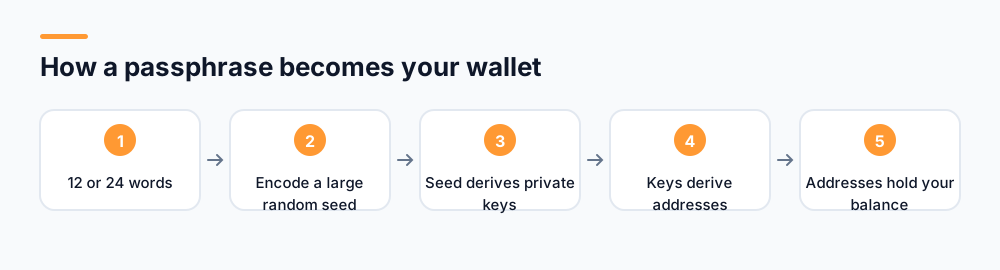
This is why the passphrase is so powerful and so dangerous. It is not a credential that grants access to an account held elsewhere. It is the cryptographic material from which control is derived. Anyone holding those words can reconstruct your wallet on their own device without touching your phone.
What this means in practice
Your passphrase is not like a bank password, where the bank can verify you and restore access. It is closer to being the only key to a safe with no locksmith. Whoever has the words has the contents, and losing them means the contents are gone.
Why not just store it, so support can help?
It is a fair question, and the answer is a genuine trade-off rather than laziness. A project could hold your keys on its servers and offer password resets like any normal service. Custodial exchanges do exactly that, and for many people that is the right choice.
But it changes what you own. If the project holds the keys, you do not control your balance — you hold a claim against the project. That claim depends on the project remaining solvent, honest, not being hacked, and not freezing your account. The history of crypto contains a long list of custodial services where users discovered their claim was worth nothing.
Non-custodial design removes that dependency. Nobody can freeze your balance, seize it, or lose it in someone else's bankruptcy. The unavoidable cost is that nobody can rescue you either. You are holding real control, and control cannot be delegated only when convenient.
| Custodial | Non-custodial | |
|---|---|---|
| Who holds keys | The provider | You |
| Password reset | Yes | Not possible |
| Account can be frozen | Yes | No |
| At risk if provider fails | Yes | No |
| If you lose your credentials | Recoverable | Balance is gone |
How to store a passphrase properly
The goal is a copy that survives years, is not accessible to anyone else, and does not depend on a single physical location or a device you might lose.
Do this
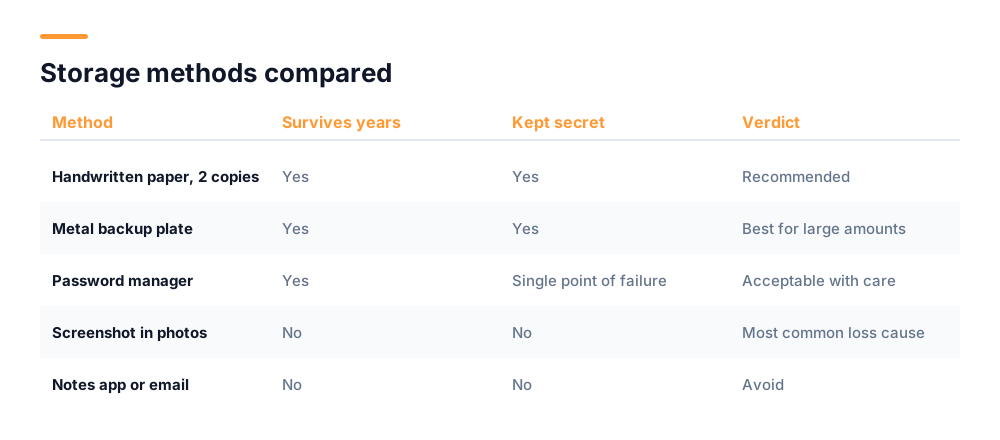
- Write it on paper by hand, in order, and double-check every word against what the app displayed.
- Make two copies and keep them in different physical places — one at home, one somewhere else you control, such as a safe or with family.
- Store it somewhere protected from water and fire. A sealed bag inside a small fireproof box costs very little.
- Record which wallet and which app it belongs to. In two years you will not remember.
- For significant amounts, consider a metal backup plate. They exist precisely because paper does not survive floods and fires.
- Test recovery once, with a small amount, before you rely on it. An untested backup is an assumption.
Do not do this
- Do not screenshot it. Photos sync to cloud services, and a cloud account compromise then becomes a wallet compromise.
- Do not store it in notes apps, email drafts, or messaging apps to yourself. All are readable by anyone who gets into that account.
- Do not put it in a password manager unless you fully accept that the manager becomes a single point of failure.
- Do not type it into any website, ever, for any reason.
- Do not split it across several digital places thinking that helps. Partial phrases meaningfully reduce the work for an attacker.
- Do not tell anyone the words, including family, unless you are deliberately arranging inheritance — and then write instructions rather than sharing casually.
The screenshot problem
Screenshots are the single most common cause of passphrase loss and theft. They get deleted in a cleanup, lost with a broken phone, or exposed when a cloud photo account is breached. It takes two minutes to write the words on paper.
Twelve words or twenty-four — does it matter?
You will see both lengths, and people occasionally argue that twenty-four words is meaningfully safer. In practice the distinction is close to irrelevant for how wallets are actually lost. Twelve words encode roughly 128 bits of randomness; twenty-four encode roughly 256 bits. Both numbers are far beyond anything that can be searched by brute force with any conceivable computing resource.
To put 128 bits in perspective: guessing a twelve-word phrase is comparable to picking one specific atom out of a substantial fraction of the observable universe, and you would need to do it on the first attempt. Doubling that to 256 bits does not make an impossible task more impossible in any way that affects you.
Nobody has ever lost a wallet because twelve words were guessed. Wallets are lost because the words were screenshotted and the photo vanished, or written down with a transcription error, or handed to somebody impersonating support. Those are the failure modes worth defending against, and phrase length does nothing for any of them.
The mistakes that actually cost people their balances
It is worth being specific about how this goes wrong, because the failures are mundane rather than exotic.
- Transcription errors. A word written illegibly, or two words swapped in order, makes the whole phrase invalid. Word order is part of the data, not a convenience. Check each word against the app before closing the screen.
- Similar-looking words. The standard word list contains pairs that are easy to confuse when handwritten, and only the first four letters of each word are significant. Print clearly rather than writing in cursive.
- Assuming the app remembers. Reinstalling an app, switching phones, or clearing app storage removes the wallet from the device. The passphrase is the only thing that brings it back.
- One copy in one place. A single sheet of paper in one drawer is one house fire, one flood, or one overenthusiastic tidying session away from gone.
- Never testing recovery. People discover their backup was wrong at the exact moment they need it. Restore once with a trivial amount to confirm the words work.
- Storing the words with the device. A note in the same case as the phone means whoever takes the phone takes everything.
What happens if something happens to you?
This gets ignored and should not be. If you hold crypto non-custodially and nobody else can reach your passphrase, that balance vanishes when you do. There is no probate process that can recover it, because there is no institution to petition.
A workable approach: write clear instructions describing which wallets exist and where the backups are, and store those instructions separately from the passphrase itself. A sealed envelope with a solicitor, or a safe deposit box with a trusted person able to access it, keeps the words secure while ensuring they are not lost with you. The instructions should not contain the words — only where to find them.
What if you have already lost it?
If you still have the wallet installed and unlocked on your device, you are in a recoverable position. Most wallets let you view the passphrase again from a security or backup section, usually after re-authenticating. Do that now, write it down properly, and the problem is solved.
If you no longer have access to the device and have no copy of the words, the honest answer is that the balance is not recoverable by anyone. No support team, no project, no tool can derive it, because the information required simply does not exist anywhere else. Services claiming to recover lost seed phrases are without exception fraudulent, and they specifically target people in this situation because desperation makes ordinary scepticism much harder to sustain.
Nobody legitimate will ever ask for it
This is worth stating as an absolute, because the exceptions people imagine are exactly how balances are stolen. Only one thing ever needs your passphrase: the wallet app itself, at the moment you deliberately choose to restore an account, having opened it yourself.
Nothing else. Not a support agent. Not a verification form. Not a website offering to check your balance. Not an airdrop claim page. Not someone in a group chat who seems knowledgeable and helpful. Not a project announcement asking users to re-validate their wallets. Every single one of those is theft in progress.
If anything or anyone other than your own wallet app asks for your recovery passphrase, you are being robbed. There is no legitimate exception to this.
For the broader picture of how these attacks are presented, our guides on spotting crypto giveaway scams and whether mobile crypto mining is safe cover the specific tactics used against new users. UNC never asks for your passphrase, and no legitimate project does.
Frequently asked questions
What is a crypto recovery passphrase?
It is a list of usually twelve or twenty-four words that encodes the random number your wallet uses as its seed. Every private key and address in your wallet is mathematically derived from that seed, so entering the same words into any compatible wallet regenerates the same wallet and the same balances.
Why can support not reset my recovery passphrase?
Because it is not stored anywhere for them to reset. In a non-custodial wallet the keys exist only on your device, derived from your passphrase. That is what stops anyone from freezing or seizing your balance, and the unavoidable trade-off is that nobody can restore access if you lose the words.
Is it safe to screenshot my seed phrase?
No, and it is the most common cause of both loss and theft. Screenshots sync to cloud photo services, so a breach of that account becomes a wallet breach, and they are easily lost when a phone breaks or during a cleanup. Write the words on paper instead.
What happens if I lose my recovery passphrase?
If the wallet is still installed and unlocked, you can usually view the phrase again in its security settings — do that immediately and write it down. If you have lost access to the device and hold no copy, the balance cannot be recovered by anyone. Services offering seed phrase recovery are fraudulent.
Should I store my passphrase in a password manager?
It is better than a screenshot but makes the password manager a single point of failure for your crypto. If you do it, use a strong unique master password with two-factor authentication, and keep a paper copy as well so a lockout does not cost you the balance.
Start mining with UNC
UNC distributes coins to verified participants — no hardware, no subscription, no battery drain. Read the whitepaper for the distribution model, or check network activity in the explorer.
Get UNC on Google Play