Security Awareness
Securing Your Crypto Wallet: Best Practices for UNC Users
A UNC wallet is only as safe as the account that holds it. These are the eight best practices that actually protect it, what each one stops, and the one-minute monthly check that keeps them working.
Securing your crypto wallet on UNC means securing the account it lives in: turn on authenticator two-factor authentication, set a wallet PIN nobody can guess, protect the email address used for resets, and keep your phone locked. Those four steps stop the large majority of account takeovers.
This is the final post in UNC's Security Awareness series. Where our guide to UNC wallets explains how the wallet works, this one is a practical checklist: what to switch on, in what order, and which threats each step defeats. Product details were checked against the UNC app's code on 8 November 2026.
Disclosure: UNC publishes this blog and builds the wallet described here. We describe its protections as they exist today, including the ones that depend on you.
What securing your crypto wallet means on UNC
On UNC, securing your crypto wallet means securing your UNC account, because the two are the same thing today. UNC holds the wallets on your behalf: there is no private key on your phone and no recovery phrase to write down. Anyone who can sign in as you and knows your PIN can move your coins.
That has two consequences. The good one is that losing your phone does not mean losing your coins; you sign in on a new device and your balance is there. The demanding one is that every protection sits on the account: your password, your second factor, your recovery email and your wallet PIN. If one of them is weak, the others carry more of the load.
There is no UNC seed phrase
UNC does not issue a recovery phrase yet. When the UNC chain moves wallet keys onto your device, the app will issue one and explain how to keep it. Until then, anyone who shows you a "UNC recovery phrase" or asks you to enter one is trying to take your account.
Turn on authenticator two-factor authentication first
Authenticator two-factor authentication is the single strongest protection a UNC user can switch on, and it takes about a minute. Once enabled, signing in needs a 6-digit code from an authenticator app on your phone as well as your password, so a stolen or reused password alone no longer opens the account.
Authenticator codes are generated on your device, not sent to your phone number, which matters because phone numbers can be stolen. They are not immune to phishing, though: a fake login page can ask for the code and use it within its 30-second life. The US Cybersecurity and Infrastructure Security Agency describes app-based codes as a real improvement over passwords alone, while still recommending phishing-resistant methods where available.
- Open the wallet security screen in the UNC app and choose to enable two-factor authentication.
- Scan the code with an authenticator app you already use and trust.
- Enter the 6-digit code to confirm. Five wrong codes lock code entry for 15 minutes.
- Only ever type a code into the UNC app itself, never into a page you reached from a link.
Choose a wallet PIN nobody could guess
The UNC wallet PIN is a 4 to 6 digit code asked for every time coins leave your wallet, and it is separate from your password. A stolen password therefore cannot move anything on its own. That separation only works if the PIN is not also your phone unlock code, your birth year or 123456.
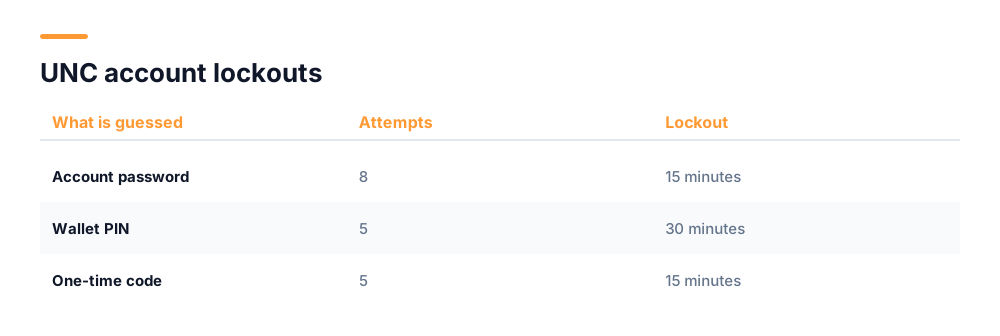
Use all six digits. A 4-digit PIN has 10,000 combinations and a 6-digit PIN has 1,000,000, a hundredfold difference. UNC also limits guessing: after five wrong PIN entries, sending is locked for 30 minutes. The table below shows every lockout the account applies.
| What is guessed | Wrong attempts allowed | Lockout |
|---|---|---|
| Account password | 8 | 15 minutes |
| Wallet PIN | 5 | 30 minutes |
| One-time code | 5 | 15 minutes |
Your email account is the key to your wallet
The email address on your UNC account is where password and PIN resets are sent, which makes that email account a second key to your wallet. An attacker who controls your inbox can request a reset and approve it. Securing your email is therefore part of securing your crypto wallet, not a separate job.
- Use a unique password for your email that you use nowhere else.
- Turn on two-factor authentication for the email account itself.
- Choose an address you will still be able to open in five years, not a work address you could lose.
- Check the email provider's list of signed-in devices and remove any you do not recognise.
- Treat any UNC reset email you did not request as a warning, and change your password from inside the app.
SIM swap protection: why your phone number is a weak link
A SIM swap is an attack in which someone persuades your mobile carrier to move your number to a SIM card they control, after which every text message meant for you goes to them. Any account that relies on SMS codes for recovery can then be reset by the attacker.
NIST, the US standards body for digital identity, classes codes sent over the phone network as a "restricted" authenticator for this reason. Two practical defences follow. Use an authenticator app rather than SMS wherever an account offers the choice, including your email provider. And ask your carrier to add a port-out PIN or account lock, which most major carriers now offer.
The warning sign of a SIM swap in progress is your phone suddenly losing signal and showing "No service" or "SOS only" in an area where it normally works. If that happens, contact your carrier from another phone straight away.
How to keep crypto safe on your phone
Keeping crypto safe on your phone starts with the phone's own lock. A device with no passcode hands anyone who picks it up a signed-in UNC app, leaving only the wallet PIN in the way. Set a passcode of at least six digits, or biometrics backed by one, and an auto-lock of a minute or less.
- Install UNC only from the App Store or Google Play, by searching for it yourself rather than tapping a link in a message.
- Keep the phone's operating system and the UNC app updated; security fixes ship in those updates.
- Do not install apps that ask for accessibility or screen-reading access without a clear reason. Those permissions can read what is on screen.
- Avoid jailbroken or rooted phones for anything holding money.
- If the phone is lost, sign in from another device and change your password, then contact UNC Support.
The fake "UNC support" and seed phrase scams
Fake UNC support and fake seed phrase requests are the impersonation scams aimed most directly at UNC wallets. Both try to make you hand over something that only you should hold: your password, your PIN, a one-time code, or a "recovery phrase" that does not exist.
The rules that defeat them are absolute. UNC never asks for your password, PIN or one-time codes, in any channel. UNC Support does not start conversations on WhatsApp, Telegram or social media. And because UNC has no seed phrase yet, any request to "verify", "sync" or "restore" one is fraud. For the P2P market specifically, support acts only inside an order's dispute case.
If you shared any of these, change your password from inside the app immediately, change your email password, and contact UNC Support. Escrowed UNC in an open P2P trade cannot be sent elsewhere, but the rest of your balance can, so speed matters.
What to do if you think your UNC account is compromised
If you think your UNC account is compromised, act in the order that closes the most doors fastest. Signs include a password or PIN reset email you did not request, a sign-in you do not recognise, or wallet activity you did not make. Minutes matter, because an attacker who is in will try to send your balance before you notice.
- Change your UNC password from inside the app, not from a link in an email.
- Change the password on the email account linked to UNC, and turn on its two-factor authentication if it was off.
- Check that two-factor authentication is still enabled on UNC. Attackers sometimes switch it off once they are in.
- Choose a new wallet PIN that has never been used anywhere else.
- Review recent wallet activity and note anything you did not make, with dates and amounts.
- Contact UNC Support through the app and describe what you saw.
Keep a note of what happened and when. If anything was taken, report it to your national fraud body as well; in the US that is the FBI's Internet Crime Complaint Center.
A one-minute monthly wallet security checklist
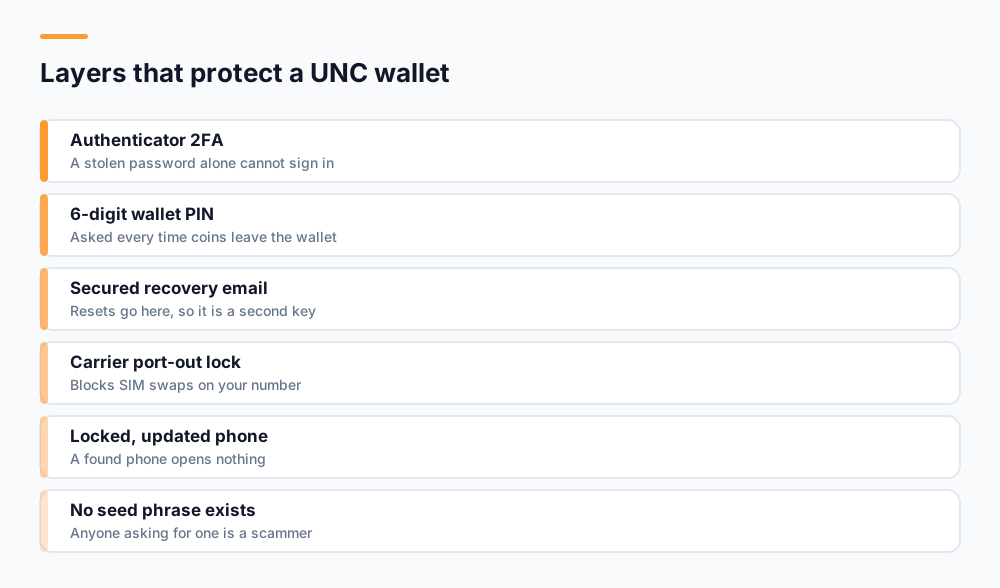
A monthly wallet security check takes about a minute and catches the slow failures: an old email address, a second factor on a phone you no longer use, or a PIN that has crept into use somewhere else. Set a reminder and run through these eight points.
- Two-factor authentication is on, and the authenticator app is on the phone you carry.
- Your wallet PIN is six digits and used nowhere else.
- The account email is current, and you can open it.
- That email account has its own two-factor authentication.
- Your carrier account has a port-out PIN or lock.
- The phone has a passcode and auto-lock.
- The UNC app and the operating system are up to date.
- Your recent wallet activity contains nothing you do not recognise.
If you trade on the UNC P2P market, the other two posts in this series cover the risks there: how to identify P2P scams, and the dangers of early fund release.
Frequently asked questions
Does the UNC wallet have a seed phrase?
No. UNC holds wallets on your behalf today, so there is no private key on your phone and no recovery phrase. Your wallet is protected by your password, authenticator two-factor authentication, recovery email and wallet PIN. Anyone asking you for a "UNC seed phrase" is attempting to steal your account.
What happens if I enter the wrong wallet PIN too many times?
After five wrong wallet PIN entries, sending from your UNC wallet is locked for 30 minutes. Password attempts lock after eight tries for 15 minutes, and one-time codes after five tries for 15 minutes. The lockouts slow down guessing; they do not protect a PIN someone already knows.
Is an authenticator app safer than SMS codes for crypto?
Yes, against SIM swap attacks. Authenticator codes are generated on your device, so stealing your phone number does not give an attacker your codes, while SMS codes follow the number. Authenticator codes can still be phished by a fake login page, so only ever enter them in the official app.
What should I do if I lose my phone with the UNC app on it?
Your coins are held in your UNC account, not on the phone, so they are not lost with it. If you still have your password and authenticator, sign in on another device and change your password. If the authenticator app was only on the lost phone, contact UNC Support, and afterwards use an authenticator with an encrypted backup.
Will UNC ever ask for my PIN or password?
No. UNC never asks for your password, wallet PIN or one-time codes by message, email, phone call or social media, and UNC Support does not start private conversations about your account. Anyone who asks for these is impersonating UNC, however official the request looks.
Start mining with UNC
UNC distributes coins to verified participants — no hardware, no subscription, no battery drain. Read the whitepaper for the distribution model, or check network activity in the explorer.
Get UNC on Google Play