Getting Started
UNC Wallets: How the UNC App Wallet Works and How to Use It Safely
UNC wallets are the wallets built into the UNC app, where mined UNC lands and from which you send it. Here is who holds the coins, how sending and receiving work, which protections are real, and what the wallet cannot do yet.
UNC wallets are the wallets inside the UNC mobile app: each one has a UNC address, holds the coins you mine or receive, and lets you send UNC to other UNC users with a PIN. Today UNC holds those wallets for you, which makes them simple to use but different from a self-custody Web3 wallet.
This guide is for people who are new to crypto, including readers in the San Francisco Bay Area who have heard the words "wallet", "custody" and "seed phrase" without anyone explaining how they fit together. It covers how the UNC wallet works, how to use it step by step, what actually protects it, and how it compares with other kinds of wallet.
Key takeaways
UNC holds UNC wallets on your behalf; there is no private key or recovery phrase to write down. You can have up to three wallets per account, and only the active one can send. Sending needs approved identity verification (KYC) and a 4–6 digit wallet PIN; five wrong PIN entries lock sending for 30 minutes. UNC can only be sent to other UNC addresses. Anyone who asks for a "UNC seed phrase" is running a scam.
Disclosure: UNC publishes this blog and builds the app and wallet described here. We have tried to describe the wallet as it works today, including its limits, rather than as we would like it to be.
What are UNC wallets?
UNC wallets are accounts on the UNC network that live inside the UNC app. Each wallet has its own UNC address, a balance, and a transaction history, and the app uses it to receive mining rewards, referral bonuses and transfers from other people. You create one from the Wallet tab the first time you open it.
One UNC account can hold up to three wallets. You might keep one for everyday sending and another, labelled "Savings", that you rarely touch. Exactly one wallet is active at a time: mining rewards, sends and receives all use the active wallet, and you switch between them in Wallet Settings. Only the active wallet can send.
Every transaction in the history shows its type (mining reward, sent, received, P2P trade or referral bonus), the time, the block and a transaction hash. Those hashes can be looked up on the UNC explorer, which is how you check a transfer independently of the app. Our guide to what a blockchain explorer is explains how to read one.
Is the UNC wallet a Web3 cryptocurrency wallet?
The UNC wallet is not a self-custody Web3 cryptocurrency wallet today. A Web3 wallet, as ethereum.org describes it, is software that holds your own keys and connects to applications on a blockchain; whoever has the keys controls the funds. UNC wallets are custodial: UNC issues the address and holds the coins, and no private key exists on your phone.
Custody is the most important idea for a beginner to understand. With self-custody, nobody can freeze or reverse your funds, but nobody can rescue them either: lose the recovery phrase and the coins are gone. With custody, the provider can restore access through your account, email and identity checks, but you depend on the provider being honest and secure.
UNC plans to move to keys generated on the device, with a genuine recovery phrase unique to each user, once its own chain is live. Until then the app deliberately shows no seed phrase. An earlier version displayed twelve placeholder words that were the same for every user; it was removed because it taught people to guard a backup that did not exist. Our article on what a crypto recovery passphrase is explains how real ones work.
How does the UNC wallet compare with other crypto wallets?
The UNC wallet sits closest to an exchange account: easy to use, recoverable through your account, and held by the company that runs it. Self-custody mobile wallets and hardware wallets give you the keys and the full responsibility that comes with them. The table below sets out the differences that matter when choosing a crypto wallet for mobile users.
| UNC wallet (today) | Self-custody mobile wallet | Exchange account | Hardware wallet | |
|---|---|---|---|---|
| Who holds the keys | UNC | You, on your phone | The exchange | You, on a separate device |
| Recovery phrase | None; recovery is through your UNC account | Yes; losing it means losing the funds | None; recovery through the exchange | Yes; losing it means losing the funds |
| Can send to | Other UNC addresses only | Any address on supported chains | Supported chains, after withdrawal checks | Any address on supported chains |
| Main risk | Depends on UNC's security and honesty | Phishing and lost phrases | Exchange failure or freezes | Lost device plus lost phrase |
| Best for | Mining, sending and paying within UNC | Using many Web3 apps | Buying and selling many coins | Holding larger amounts long term |
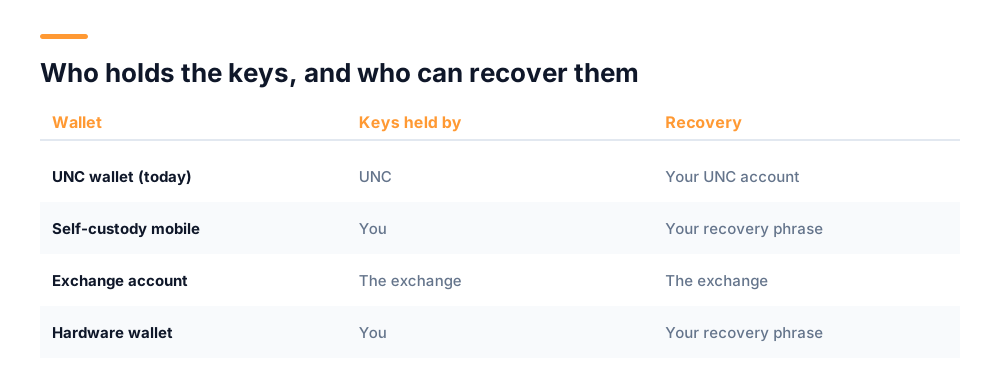
None of these is the "right" wallet for everyone. Many people use more than one: a custodial wallet for convenience and a self-custody wallet for amounts they want only themselves to control.
How to use the UNC Tech Wallet, step by step
Using the UNC Tech Wallet comes down to four tasks: creating a wallet, receiving UNC, sending UNC and switching between wallets. Each takes under a minute once your account is set up. Sending to other people also needs identity verification, so start that early if you plan to send.
Create your wallet
Open the Wallet tab and tap "Start Creating a Wallet". The app issues your UNC address and walks you through the protections that matter: a wallet PIN, two-factor authentication, and a recovery email you can actually reach. It shows whether each one is already on.
Receive UNC
Tap Receive to see your address and its QR code. Copy the address or tap Share to send it in a message. The sender can scan the QR code or paste the address. Mining rewards arrive in the active wallet automatically.
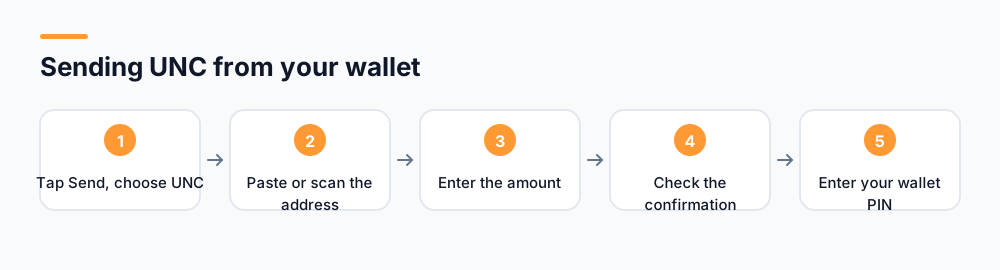
Send UNC
- Tap Send and choose the asset (UNC).
- Paste the recipient's UNC address or tap Scan QR code.
- Enter the amount; the app shows your available balance and refuses an amount above it.
- Check the confirmation screen, which repeats the amount and the full address.
- Enter your wallet PIN. If you have not set one, the app asks you to create it first.
Switch or add wallets
In Wallet Settings, tap Switch wallet to make another wallet active, or Add new wallet to create one with an optional label. Remember that new mining rewards follow the active wallet.
What keeps a UNC wallet secure?
A UNC wallet is protected by four layers: your account login, two-factor authentication, a recovery email, and a wallet PIN required for every send. Because there is no seed phrase, those account protections are what stand between your coins and someone else, so they deserve the care people usually give to a phrase on paper.
- Wallet PIN: 4 to 6 digits, asked for every transfer. After five wrong entries, sending is locked for 30 minutes, which keeps a 4-digit PIN from being guessed by trial and error.
- Two-factor authentication: a one-time code at sign-in, so a leaked password alone does not open the account.
- Recovery email: the route back in if you forget your password or PIN. Use an address you control and protect it with its own 2FA.
- Identity verification: sending UNC to other users requires approved KYC, which ties transfers to a verified person and makes stolen accounts harder to cash out.
A secure digital asset wallet also depends on habits. Lock your phone with a passcode or biometrics, keep the app updated, and never install "UNC" from a link in a message; use the App Store or Google Play listing linked from unctech.co. Our guide to KYC in crypto explains why verification exists and how to spot fake KYC requests.
Which scams target mobile crypto wallet users?
Investment fraud and impersonation are the scams that cost mobile wallet users the most. The FBI's Internet Crime Complaint Center received 149,686 complaints involving cryptocurrency in 2024, with reported losses of $9.3 billion, and people over 60 were hit hardest. Most of those losses began with a message, not a hack.
The patterns repeat. Someone posing as "UNC support" asks for your PIN or a "seed phrase" to fix your account. A stranger who befriended you online recommends a trading platform with guaranteed returns. A fake giveaway promises to double whatever you send. A text warns that your wallet will be suspended in 24 hours unless you log in through a link.
Three rules stop nearly all of them. UNC never asks for your PIN, password or one-time codes, and a UNC seed phrase does not exist, so anyone requesting one is lying. Treat a confirmed transfer as final, and check the address before entering your PIN. And no legitimate project guarantees a return. Our guide to crypto giveaway scams covers the most common versions in detail.
What can you do with UNC once it is in your wallet?
UNC in your wallet can be sent to other UNC users, spent through UNC Pay, traded with other people on UNC's peer-to-peer marketplace, or moved to your account on the UNC exchange. All of these stay within the UNC network; the wallet does not send UNC to Bitcoin, Ethereum or other blockchains.
- UNC Pay: scan a UNC Pay QR code or enter a username to pay someone, or show your own QR code to receive. Partner shops accept it in the app.
- P2P trading: buy or sell UNC with other users, with the coins held until both sides confirm.
- Send to Exchange: move UNC from the wallet to your account on the UNC exchange, protected by the same PIN.
- Transaction limits and default currency: set in Wallet Settings, along with the PIN.
UNC is a coin rather than a token: it is the native asset of its own network, not an entry in a smart contract on someone else's chain. If that distinction is new to you, our explainer on the difference between a coin and a token walks through it with examples.
What the UNC wallet cannot do yet
The UNC wallet cannot yet give you your own private keys, connect to Web3 applications such as decentralized exchanges, or hold assets from other blockchains. Those are the features that make a wallet "Web3", and they depend on UNC's own chain going live with keys generated on the device.
That matters for how you use it. Treat the UNC wallet as an account with a company, like a balance in a payment app: convenient and recoverable, but only as safe as the company running it. Do not keep anything there on the assumption that it is beyond anyone's reach, and read how UNC works before relying on it.
We also do not promise anything about what UNC will be worth. The app shows an approximate dollar value next to your balance, but that figure is not a guarantee, and you should not buy, mine or hold UNC expecting a return. When the self-custody wallet arrives, this guide will be updated with the date of the change.
Frequently asked questions
Are UNC wallets custodial or non-custodial?
UNC wallets are custodial today. UNC issues the wallet address and holds the coins, and there is no private key or recovery phrase on your phone. You get back in through your UNC account, recovery email and identity checks. UNC plans self-custody wallets with real recovery phrases once its own chain is live.
How do I send UNC from my wallet?
Open the Wallet tab, tap Send, choose UNC, then paste or scan the recipient's UNC address and enter the amount. Check the confirmation screen and enter your 4–6 digit wallet PIN. Sending to other users requires approved KYC, and UNC can only be sent to other UNC addresses.
Is the UNC app a Web3 cryptocurrency wallet?
Not yet. A Web3 cryptocurrency wallet holds your own keys and connects to blockchain applications. The UNC wallet is held by UNC, cannot connect to decentralized apps, and only sends to other UNC addresses. It works more like a payment app balance than a self-custody wallet.
What happens if I enter the wrong wallet PIN?
After five wrong PIN entries, sending from the wallet is locked for 30 minutes, and you can try again after that. If you have forgotten the PIN, use the "Forgot PIN?" option, which emails a 6-digit code to the email address on your account. UNC staff will never ask you to tell them your PIN.
Can I have more than one UNC wallet?
Yes. One UNC account can connect up to three wallets, each with its own address and optional label. Only the active wallet can send, and mining rewards, sends and receives all use the active one. You switch wallets in Wallet Settings or from the wallet list in the app.
Start mining with UNC
UNC distributes coins to verified participants — no hardware, no subscription, no battery drain. Read the whitepaper for the distribution model, or check network activity in the explorer.
Get UNC on Google Play