Getting Started
What Is KYC in Crypto, and Why Do Apps Ask for Your ID?
Handing a photo of your passport to a crypto app feels uncomfortable, and the discomfort is reasonable. Here is what KYC actually is, why it exists, and what you should demand to know before submitting anything.
At some point most crypto apps will ask you to verify your identity. Usually that means photographing an official document and taking a selfie. If your instinct is hesitation, that instinct is healthy — you are being asked to hand highly sensitive material to a company you may know little about.
The right response is neither blanket refusal nor blind compliance. It is understanding what KYC is for, what a legitimate process looks like, and which questions to ask before uploading anything. This guide covers all three, plus how to distinguish a real verification request from a phishing attempt dressed up as one.
What KYC actually means
KYC stands for Know Your Customer. It is a regulatory requirement, not a crypto invention, and it long predates blockchain. Banks have done it for decades. When you opened a bank account and were asked for identification and proof of address, that was KYC.
The requirement comes from anti-money-laundering law. Governments require financial businesses to establish who their customers actually are, so that criminal proceeds cannot move through the financial system anonymously. Firms that fail to comply face substantial penalties and, in serious cases, lose the ability to operate.
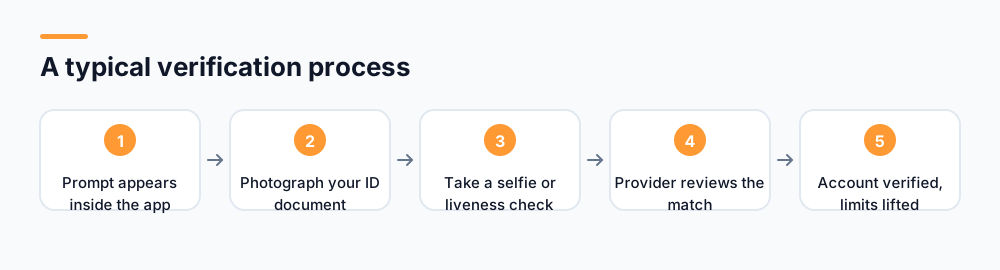
A typical process asks for three things: an official photo identity document, a selfie or short video to confirm you are the person in that document, and sometimes proof of address such as a utility bill. Some services add a liveness check, asking you to turn your head or blink, which exists to stop somebody submitting a photograph of a photograph.
Why crypto apps need it when crypto was meant to be anonymous
This is the fair objection, and it deserves a direct answer. Bitcoin was designed so that transactions between addresses need no permission or identification. That property still holds at the protocol level — the network does not know who you are.
But businesses built on top of a network are not the network. The moment a company holds customer funds, converts crypto to conventional currency, or operates as a financial service in a particular country, it falls under that country's financial regulation. The blockchain's indifference to identity does not exempt the company from the law where it operates.
There is a second reason specific to mining and reward distribution, and it is arguably more relevant to you. Any system that gives away coins to participants faces an obvious attack: one person creating thousands of accounts to claim thousands of shares. Identity verification is how a project ensures rewards go to distinct humans rather than to whoever can automate account creation most effectively.
Why verification protects you specifically
In a participation-based network, every fake account claiming rewards dilutes the share available to real participants. Verification is not only a legal box to tick — it is what stops your allocation being diluted by automated farms.
What happens to your documents
This is the part people most want to know and are least often told. In a well-run process, your documents are transmitted over an encrypted connection, checked either automatically or by a reviewer, and then either deleted or retained in encrypted storage for a period the law specifies.
Retention is worth understanding, because it often surprises people. Anti-money-laundering rules typically require firms to keep verification records for around five years after a relationship ends. So a company promising to delete your ID immediately after checking it may be describing something it is not permitted to do. Honest services explain the retention period rather than pretending it does not exist.
Most projects do not build verification themselves. They use a specialist provider, and your documents go to that provider rather than sitting on the app company's own servers. This is generally good — those firms are audited and specialise in exactly this — but it means a third party holds your data, and the privacy policy should name them.
Questions to answer before you submit anything
Verification is a reasonable request from a legitimate service. It is a serious risk with an illegitimate one. These are the checks worth making first.
- Does the privacy policy specifically describe what is collected, who processes it, where it is stored and how long it is kept? Vague reassurance is not a policy.
- Is verification handled by a named, identifiable provider? A recognisable name is a meaningful positive signal.
- Is the connection secure, and is the domain exactly right? Check the address bar character by character before uploading.
- Is the request coming from inside the app you installed, rather than from a link you were sent? This single check defeats most phishing.
- Can you delete your account and data afterwards, subject to legal retention? A service without a deletion route has not thought about the obligation.
- Does the amount requested match the purpose? A mining app needing your ID and selfie is normal. One also demanding bank statements and your employer's details is not.
Fake verification requests, which are common
Because users have been trained to expect KYC, attackers exploit it. A fake verification request is one of the most effective phishing formats in crypto, precisely because the real thing also asks for unusual and sensitive material.
The typical approach: an email or message claiming your account requires urgent re-verification, with a warning that it will be suspended otherwise. The link leads to a convincing replica. Whatever you upload goes straight to the attacker, and identity documents are directly monetisable — used for opening accounts elsewhere in your name.
The rule that defeats this
Never begin verification from a link in a message. Close it, open the app you installed yourself, and look for the prompt there. If there is no prompt inside the app, the message was fake. This works regardless of how convincing the replica is.
A related variant asks for your recovery passphrase as part of "verifying wallet ownership". No verification process anywhere requires your passphrase. Identity checks confirm who you are, using documents; they never require the cryptographic material that controls your funds. Any request combining the two is theft.
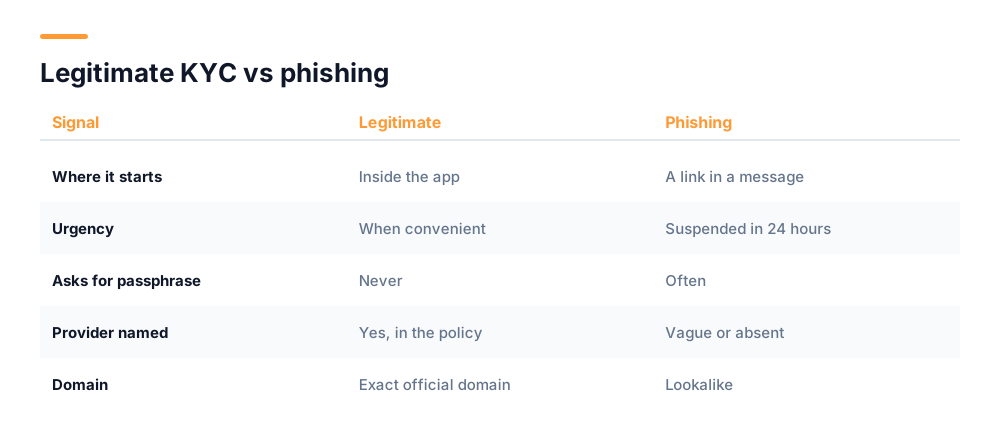
| Signal | Legitimate KYC | Phishing |
|---|---|---|
| Where it starts | Inside the app you installed | A link in a message |
| Urgency | Complete when convenient | Account suspended in 24 hours |
| Asks for passphrase | Never | Often, framed as ownership proof |
| Provider named | Usually, in the policy | Vague or absent |
| Domain | Exact official domain | Lookalike or subdomain |
Why verification gets rejected, and what to do
Rejections are common and usually have nothing to do with suspicion about you. Most are image quality problems, which is mildly infuriating but easily fixed on a second attempt.
- Glare on the document. Photograph it away from direct light and overhead bulbs. The reflective coating on modern IDs is the single most frequent cause.
- Blur or cropping. All four corners must be visible and every character legible. Rest the document on a flat surface rather than holding it.
- Expired document. Check the date before you start. An expired ID will be rejected regardless of image quality.
- Name mismatch. The name on your account must match the document. If you registered with a shortened or informal version, correct the account first.
- A photo of a screen. Photographing a scan displayed on a monitor fails liveness checks by design, because it is exactly what a fraudster would do.
- Unsupported document type. Some services accept only passports, others also driving licences or national ID cards. Check what is accepted before photographing.
If a second attempt also fails, contact support through the app rather than searching for a support channel elsewhere — fake support accounts specifically target people frustrated by a failed verification, because that frustration is what makes an offer of help feel welcome rather than suspicious.
What if you would rather not verify?
That is a legitimate position, and it has consequences worth understanding rather than discovering later. On most services, declining verification means reduced functionality — you may be able to accumulate a balance but not withdraw it, or you may be limited to small amounts.
Two things are worth checking before you commit time to an unverified account. First, whether the limits are stated clearly upfront; a service that lets you accumulate for months before revealing that withdrawal requires verification has been less than straight with you. Second, whether verification is even available in your country, since some services operate in a limited set of jurisdictions.
If you are uncomfortable with a specific service holding your documents, the alternative is not to use that service. What you should not do is submit documents to a project you have not evaluated, on the assumption that verification is routine and therefore safe. The process is routine. The recipient is what varies.
If you think you submitted documents to a fake site
Act on the assumption that the documents are now in circulation. Identity documents are traded and used to open accounts in the victim's name, and the damage typically appears weeks or months later rather than immediately.
- Contact your bank and any financial provider, and ask them to note a fraud risk on your file.
- Register with your country's credit monitoring or fraud-alert service so applications in your name are flagged.
- Report it to your national cybercrime or fraud reporting body. This is also how patterns get investigated.
- If a passport or driving licence was submitted, ask the issuing authority what their guidance is. Replacement is sometimes recommended.
- Change the password on the real account and enable two-factor authentication, in case credentials were captured too.
- Tell the genuine project, so they can get the fake domain taken down and warn other users.
Identity verification is a normal requirement. Starting it from a link somebody sent you is not. The process is safe; the entry point is what gets people.
For related risks aimed at new crypto users, our guides on spotting crypto giveaway scams and whether mobile crypto mining is safe cover the tactics in more detail. UNC's own retention and processing practices are set out in the privacy policy.
Frequently asked questions
What does KYC mean in crypto?
KYC stands for Know Your Customer. It is an anti-money-laundering requirement, not specific to crypto, that obliges financial businesses to establish who their customers are. In practice it means submitting an official photo ID, a selfie to confirm you match it, and sometimes proof of address.
Why does a mining app need my ID if crypto is anonymous?
The blockchain itself does not know who you are, but companies operating on top of it are subject to financial regulation where they do business. For reward distribution there is a second reason: verification prevents one person creating thousands of accounts to claim thousands of shares, which would dilute genuine participants.
Is it safe to send my passport photo to a crypto app?
It depends entirely on the recipient. Check that the privacy policy specifies what is collected, who processes it and how long it is retained, that a named verification provider is used, and crucially that you started the process inside the app rather than from a link you were sent.
How can I tell a fake KYC request from a real one?
Real verification starts inside the app you installed. Phishing starts with a link in an email or message, usually with urgency about suspension. Close any such message, open the app directly, and check whether a prompt exists there. If not, the message was fake.
Will KYC ever require my recovery passphrase?
Never. Identity verification confirms who you are using documents. It has no need for the cryptographic material controlling your funds. Any process asking for both your ID and your passphrase is an attempt to steal your balance, regardless of how official it appears.
Start mining with UNC
UNC distributes coins to verified participants — no hardware, no subscription, no battery drain. Read the whitepaper for the distribution model, or check network activity in the explorer.
Get UNC on Google Play