Getting Started
What Is a Blockchain Explorer, and How Do You Use One?
It is the difference between being told your balance and checking it. Once you can read an explorer, you never have to take an app entirely on trust again.
When an app shows you a balance, you are trusting the app. A blockchain explorer lets you check the same information against the network itself, independently of whoever built the app. That shift — from being told to verifying — is the single most useful skill for anyone holding crypto, and it takes about ten minutes to learn.
This guide covers what an explorer is, how to read the screens you will actually encounter, what each field means, and the specific situations where checking an explorer answers a question nothing else can.
What a blockchain explorer actually is
A public blockchain is a shared record that anyone can read. Every transaction ever made is in it, permanently. That is fundamental to how these networks establish trust without a central authority — instead of trusting an institution's records, participants can check the record themselves.
The raw data, however, is not designed for humans. A blockchain explorer is a website that reads it and presents it legibly: searchable, formatted, and cross-linked. It is a viewer, nothing more. It does not control the network, cannot alter anything, and holds no funds. If an explorer disappeared tomorrow, the blockchain would be unaffected — someone would simply build another viewer.
This is worth internalising, because it explains why an explorer is trustworthy in a way an app is not. An app shows you what its database says. An explorer shows you what the network says. When those two disagree, the network is right.
What you can look up
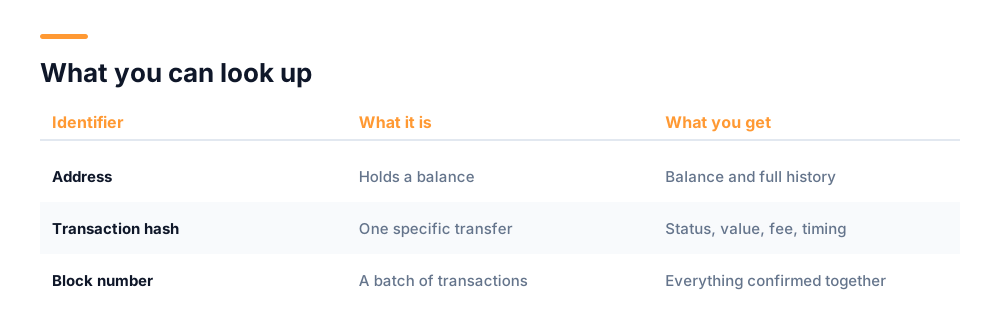
Explorers accept three kinds of search, and understanding which you have saves confusion.
- An address — the identifier that holds a balance. Searching one shows its current balance and full transaction history.
- A transaction hash — a long unique string identifying one specific transfer. This is what you check when you want to know whether a payment went through.
- A block number or hash — a batch of transactions confirmed together. Less commonly needed, but useful for understanding timing.
Addresses and transaction hashes look superficially similar — both long strings of letters and numbers — and people frequently search for one expecting the other. If a search returns nothing, that is often why. Most explorers will tell you which type they think you entered.
How to read a transaction page
This is the screen you will look at most, usually because you are wondering whether something arrived. The fields that matter:
Status
Success means it completed and the balance moved. Pending means the network has seen it but has not yet confirmed it. Failed means it was processed but did not complete — and importantly, a failed transaction still costs a fee, because the network did the work of processing it even though the outcome was rejection.
Confirmations
How many blocks have been added since this transaction was included. More confirmations means it is progressively harder to reverse. One confirmation is usually enough for small amounts; larger transfers conventionally wait for several. The count keeps rising forever, so a very high number simply means the transaction is old.
From and To
Sender and recipient addresses. Worth checking character by character against what you expected, particularly the middle of the string — malware that swaps a copied address for an attacker's typically preserves the first and last few characters so it passes a glance.
Value and fee
Value is what was sent. Fee is what it cost to send. These are separate, and on some networks the fee is charged in addition to the value rather than deducted from it — which occasionally surprises people whose balance drops by slightly more than they sent.
Timestamp and block
When it was confirmed, and which block contains it. Useful for reconciling records and for establishing exactly when something happened, which matters for tax records.
Pending is normal, and usually resolves itself
A transaction sitting pending is not lost. It is waiting to be included in a block, which takes longer when the network is busy or the fee offered was low. It either confirms or eventually drops out of the queue, at which point the funds were never sent.
How to read an address page
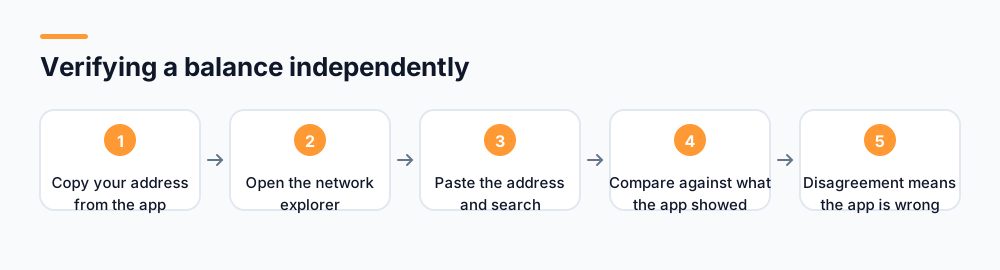
Searching an address shows its balance and every transaction it has ever been part of. This is what you use to verify a balance independently of any app.
Two things to understand about balances here. First, an address page shows the network's view, which is definitive. If your app says one number and the explorer says another, either the app is showing a pending transaction the network has not confirmed, or the app is wrong. Second, on chains that host tokens, an address may hold several different assets, and explorers usually separate the native coin balance from token balances into different sections.
The transaction list is a complete history, oldest to newest or the reverse depending on the explorer. Nothing can be removed from it. This permanence is worth pausing on: an address's entire history is public forever, to anyone who knows the address. Addresses are pseudonymous rather than anonymous — not linked to your name by default, but every movement is visible, and if an address is ever connected to your identity, that connection applies retroactively to everything it has ever done.
When an explorer answers a question nothing else can
- "Did my transfer arrive?" Search the transaction hash. The status field answers definitively, without waiting for support.
- "Is this app's balance real?" Search your address. If the explorer shows nothing while the app shows a balance, the balance exists only in that app's database.
- "Does this project have a real network?" Look for its explorer at all. A project claiming a blockchain but offering no way to inspect it is claiming something it may not have.
- "Why is my transaction stuck?" Check confirmations and the fee paid. A low fee during congestion is the usual answer.
- "Is this address suspicious?" Look at its history. Addresses used in scams often show many small inbound transfers rapidly consolidated outward.
- "What did I actually pay in fees this year?" The address history is a complete, timestamped record, which is exactly what tax reporting requires.
Using an explorer to decide what fee to pay
This is a less obvious use, and it saves money. Most explorers display current network conditions — how busy the chain is, and what fee level transactions are actually being confirmed at right now. Checking before you send lets you avoid two opposite mistakes.
Paying too little means your transaction sits pending, possibly for hours, because miners or validators prioritise higher-paying ones. Paying too much means you have simply overspent, sometimes by a considerable multiple, for a transaction that would have confirmed anyway.
Network activity is also strongly cyclical. Fees on busy chains vary substantially across the day and week, and if a transfer is not urgent, waiting a few hours can cost meaningfully less. An explorer showing recent blocks and their fee levels is the easiest way to see where you currently are in that cycle.
One caveat: wallets usually estimate fees for you, and their estimates are generally reasonable. Checking an explorer is worth the effort for larger transfers, or when a wallet's suggestion looks surprising — which occasionally happens when an estimate is based on stale data.
What an explorer cannot tell you
It is worth being clear about the limits, because over-reading an explorer causes its own confusion.
- Who owns an address. Explorers show addresses, not identities. Labels are occasionally added for well-known exchange addresses, but most are anonymous.
- Why a transaction was made. The record shows movement, not intent.
- Whether a coin is legitimate. Anyone can create a coin with any name. Appearing in an explorer proves existence, not honesty.
- Whether you can reverse something. You cannot. The explorer will show you a mistaken transfer in full detail and there is nothing to be done about it.
- Off-chain activity. Balances held inside a custodial service are internal records, not blockchain transactions, so they do not appear.
Explorers can be impersonated too
Fake explorer sites exist, designed to show whatever balance persuades you of something. Reach an explorer by typing its address or following a link from the project's official site — never from a message.
The privacy implication people miss
Because an explorer makes every transaction public and permanent, it is worth thinking about what that means for you rather than only what it lets you check. Anyone who knows one of your addresses can see its complete history: every amount, every counterparty address, every timestamp, going back to its first transaction.
This matters more than it first appears. If you give an address to somebody so they can pay you, you have also shown them your balance and your entire transaction history. Most people would not hand over a bank statement in that situation, but sharing an address does something functionally similar.
The conventional mitigation is not to reuse addresses. Many wallets generate a fresh receiving address for each payment precisely for this reason, which keeps activity from accumulating visibly against a single identifier. If your wallet does this automatically, let it, rather than reusing one address because it is convenient.
Getting comfortable with it
The best way to learn is to look up something you already know about. Find a transaction you made yourself, search its hash, and compare each field against what your app told you. Once you have seen the two agree, you understand what the explorer is for, and you will know what a disagreement looks like.
Then bookmark the explorer for any network you hold assets on, reached from the project's official site. Having it saved means that when something looks wrong at an inconvenient moment, verifying takes seconds rather than requiring you to first work out where to look.
An app tells you your balance. An explorer lets you check it. The gap between those two things is where a great many people have lost money.
UNC network activity is publicly viewable in the explorer at explorer.unctech.co. For the distinction between assets with their own chain and those hosted on another, see our guide on coins versus tokens.
Frequently asked questions
What is a blockchain explorer?
It is a website that reads a public blockchain and presents it in a human-readable, searchable form. It lets anyone look up addresses, transactions and blocks without permission. It is only a viewer — it does not control the network, cannot change anything, and holds no funds.
How do I check if my crypto transaction went through?
Find the transaction hash, which your wallet shows after sending, and search it in the explorer for that network. The status field will show Success, Pending or Failed. Pending means it is waiting for confirmation, usually because the network is busy or the fee was low.
Can I use an explorer to verify an app is telling the truth about my balance?
Yes, and it is one of the most useful checks available. Search your address in the explorer for that network. If the explorer shows no balance while an app shows a large one, the balance exists only in that app's own database and is not on any blockchain.
Does a blockchain explorer show who owns an address?
No. Explorers show addresses, not identities. Addresses are pseudonymous rather than anonymous — not linked to your name by default, but every transaction is permanently public, so if an address is ever connected to you, its entire history is too.
What does the confirmations number mean?
It counts how many blocks have been added since your transaction was included. More confirmations make it progressively harder to reverse. One is generally sufficient for small amounts; larger transfers conventionally wait for several. The number rises indefinitely, so a high count just means it is old.
Start mining with UNC
UNC distributes coins to verified participants — no hardware, no subscription, no battery drain. Read the whitepaper for the distribution model, or check network activity in the explorer.
Get UNC on Google Play